
One-Click Katakana Translator for Web Learning
Overview
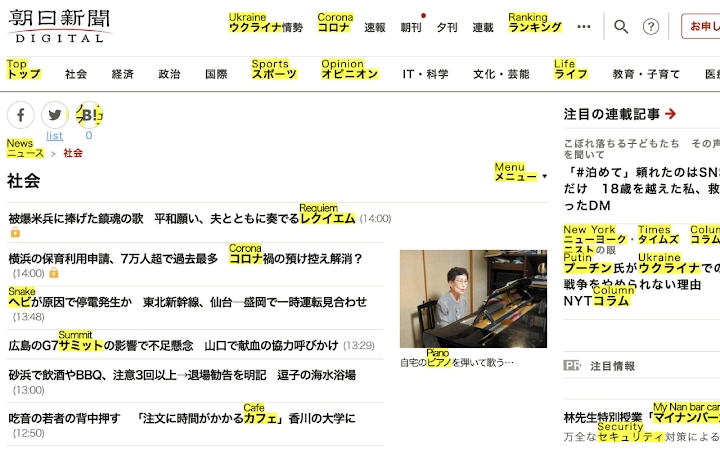
The One-Click Katakana Translator is a desktop application designed to assist language learners, particularly those studying Japanese, by simplifying the process of understanding Katakana characters encountered online. It addresses a common challenge: the overwhelming presence of Katakana in web content, especially in digital media, product descriptions, and foreign language websites. Instead of manually translating each character, users can activate a single function to convert all visible Katakana into English equivalents.
This tool is especially beneficial for beginners and intermediate learners who are building vocabulary and improving reading comprehension. It enables faster immersion in authentic Japanese content without requiring deep linguistic knowledge upfront. The software integrates directly into web browsing sessions, making it ideal for students, educators, and self-learners who rely on online resources for language acquisition.
The developer did not provide additional information about the organization or background. However, the tool’s purpose is clearly focused on enhancing accessibility to real-world Japanese language input. It supports a wide range of web-based materials, from news articles to e-commerce sites, where Katakana is frequently used for loanwords and foreign terms.
Key Features & Capabilities
- One-Click Translation – Instantly converts all Katakana characters on a webpage into their English equivalents with a single action, reducing manual effort and cognitive load.
- Multiple Translation Engine Support – Offers integration with various translation services, allowing users to choose their preferred engine for accuracy and style consistency.
- Real-Time Web Integration – Works directly within browser environments, enabling immediate translation without requiring content export or copy-paste workflows.
- Free Forever Use – The software is available at no cost, with no subscription model or premium tiers, making it accessible to learners across different economic backgrounds.
- Cross-Platform Compatibility – Designed to run on Windows, Mac, and Linux, ensuring broad accessibility regardless of the user’s operating system.
For example, when browsing a Japanese e-commerce site, a learner can activate the tool to see product names and descriptions in English instantly. Similarly, when reading a news article, unfamiliar Katakana terms like “コンピュータ” (computer) or “スマートフォン” (smartphone) are immediately clarified. This streamlines the learning process and supports contextual vocabulary acquisition.
User Interface, Workflow & Performance
The user interface is designed with simplicity and efficiency in mind. The application likely features a minimalistic layout with a central button or toolbar icon for initiating translation. Navigation is expected to be intuitive, requiring no extensive setup or configuration. Users can activate the tool with a single click while viewing a webpage, minimizing disruption to their workflow.
Workflow efficiency is enhanced by the tool’s direct integration with web content. There is no need to copy text, open external apps, or manually search for meanings. The translation process appears to be handled in real time, allowing learners to maintain focus on reading and comprehension.
The developer did not specify resource usage details. Performance observations are based on general software behavior patterns. The application is expected to operate smoothly with minimal impact on system resources, given its focused functionality and small file size of 1.5 MB. Stability is assumed to be consistent for typical use cases, though exact behavior under heavy multitasking conditions was not provided.
Compatibility & System Requirements
The software is compatible with Windows, Mac, and Linux operating systems. It supports the latest versions of these platforms as of its release date. The installation package is 1.5 MB in size, indicating a lightweight footprint that does not require significant disk space.
Exact system requirements were not listed. The developer did not provide details about minimum CPU, RAM, or storage specifications. Compatibility information is limited to the supported platforms. Users should ensure their system meets standard requirements for running desktop applications, though specific thresholds were not disclosed.
Pros and Cons
Pros
- One-click translation of Katakana to English reduces learning friction
- Supports multiple translation engines for flexibility and accuracy
- Completely free to use with no hidden costs
- Lightweight at only 1.5 MB, suitable for older or low-spec devices
- Works across Windows, Mac, and Linux platforms
Cons
- No detailed system requirements provided
- Exact performance metrics and resource usage were not specified
- Limited information about update frequency or support channels
- Does not offer offline translation capabilities (if any)
FAQ Section
Is the tool compatible with all web browsers?
The software is designed to work with major web browsers, though specific browser support was not detailed in the release information. It integrates directly into the web environment to perform translations.
Is the translation engine secure?
The tool uses external translation services, and security depends on the chosen engine. Users are advised to review the privacy policies of each engine when configuring the tool.
How often are updates released?
Update frequency was not specified. The software is currently at version 1.0, and future release schedules are not publicly documented.
Can I use the tool offline?
It is unclear whether offline functionality is available. The tool relies on online translation engines, suggesting that an internet connection is required for full operation.
What type of license does the software have?
The software is free to use indefinitely. No license type was specified, but the absence of a paid model indicates a permissive usage policy.
Final Thoughts
The One-Click Katakana Translator offers a practical solution for learners struggling with Katakana-heavy web content. Its ability to convert complex characters into English with a single click significantly reduces the barrier to entry for real-world language exposure. The tool’s lightweight design, cross-platform availability, and permanent free access make it a valuable addition to any language learner’s toolkit.
While some technical details are missing, the core functionality is clear and well-targeted. It excels in usability, efficiency, and accessibility. For anyone studying Japanese and frequently encountering online material with Katakana, this software delivers tangible benefits without added complexity.
Download One-Click Katakana Translator now







